
QR Codes for Events: Tickets, Check-In, Schedules & Networking (2026 Guide)
QR codes can replace paper tickets, speed up the queue at the door, and give attendees instant access to schedules and networking. This guide includes a free generator that turns your guest list into one check-in code per guest.

In 2026, 43% of event marketers use QR codes as a primary engagement channel — behind only email and social media. QR codes have become the backbone of modern event logistics: they replace paper tickets, eliminate manual check-in queues, put the full schedule in every attendee's pocket, and make networking as simple as pointing a phone.
Whether you are running a 20-person workshop or a 2,000-person conference, this guide covers every event use case with step-by-step instructions, free tools, and real examples.
Why QR Codes Are Now Standard at Events
The shift started during 2020 but has become permanent. QR codes solve three problems that every event organiser faces:
- Speed: A QR scan completes check-in in under 3 seconds. Manual name-lookup takes 4–6 minutes per person — the difference between a smooth entry and a queue stretching to the street.
- Cost: Printed programmes, physical tickets, and paper maps cost money and create waste. QR codes replace all three with zero printing cost.
- Data: Every scan is a timestamped data point. You can see exactly how many people attended, which sessions were most popular, and which sponsor booths got the most traffic.
For a broader look at how small businesses use QR codes across every touchpoint, see our guide to QR codes for small business.
Use Case 1: Event Tickets
The most common event QR code use case is also the most valuable: replacing physical tickets with a unique QR code sent by email or SMS. Here is the complete workflow:
How Event Ticket QR Codes Work
- Attendee registers and receives a confirmation email containing a unique QR code image.
- At the venue entrance, staff scan the code using any smartphone camera or a dedicated scanner app.
- The system marks the attendee as checked in and flags the code as used — preventing reprints from entering twice.
The unique identifier encoded in each ticket QR code is typically a booking reference, attendee ID, or a signed token. For small events using a simple spreadsheet, you can generate unique QR codes by encoding each attendee's email or booking number — then scan and cross-reference the list during entry.
Static vs Dynamic QR Codes for Tickets
For tickets, a static QR code encoding the booking reference is usually sufficient. The data is fixed at time of generation, which is exactly what you want for a ticket. If you need to redirect ticket holders to a changing confirmation page (e.g., if the venue changes), use a dynamic QR code that can be re-pointed. For the differences in depth, see static vs dynamic QR codes explained.
Creating Ticket QR Codes for Free
For small events, use our free QR Code Generator: enter the attendee's booking reference or unique ID, download as PNG, and embed in your email template. For larger events, most ticketing platforms (Eventbrite, Ticket Tailor, Luma) generate QR codes automatically and handle the check-in validation.
Use Case 2: Fast Event Check-In
Scanning a code is faster than finding a name on a printed list, and it leaves a record of who arrived and when. Here is how to set it up, from a ticketing platform down to a free spreadsheet method:
This section covers choosing a method. For the door as an operation — how fast a lane really is, how many lanes your arrival curve needs, and the two places duplicate detection quietly fails — see the dedicated guide to QR code check-in and the check-in lane calculator.
| Method | Best For | Cost | Setup Time |
|---|---|---|---|
| Ticketing platform (Eventbrite, Luma) | 50+ attendees, paid events | Free–3% fee | 15 min |
| Google Forms + custom QR codes | Free/community events under 100 people | Free | 30 min |
| Spreadsheet + scanner app | Workshops, meetups, internal events | Free | 20 min |
| Dedicated check-in app (QuikRSVP, Micepad) | Conferences, large events with multiple zones | Paid | 1–2 hours |
The Spreadsheet + Scanner Method (Zero Cost)
Paste your guest list below. Each guest gets a random ticket code, which is better than encoding a name or email: it reveals nothing if a ticket is photographed, and nobody can guess the next one. You get a printable sheet of QR codes (print it, or save it as a PDF and email each guest theirs) and a CSV that links every code to a name.
Make check-in QR codes for your guest list
Paste one guest per line. Each gets a unique, random ticket code. Everything happens in your browser.
- Import the CSV into Google Sheets or Excel. It has the columns name, ticket_code and checked_in.
- Send each guest their code, cut from the printed sheet or as an image in their confirmation email.
- At the door, scan with the Scan & Generate app in continuous scan mode. Every scan is saved to the history with a timestamp, so the queue keeps moving and nobody has to type.
- Reconcile afterwards: export the scan history to CSV and paste it into a sheet named Scans. The app's export puts the scanned text in column D, so
=IF(COUNTIF(Scans!D:D, B2) > 0, "yes", "")in the checked_in column marks everyone who arrived. A code that appears twice in the scan history is a ticket that was shared.
For a few hundred guests at a free event, this is all you need. For paid events where a shared ticket costs money, use a ticketing platform that rejects a code on its second scan.

Use Case 3: Event Schedule & Programme
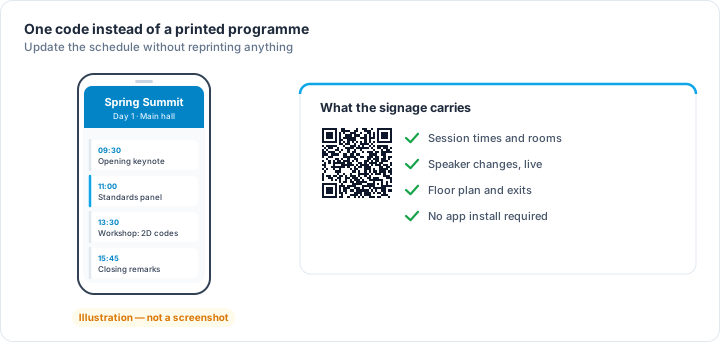
A single QR code printed on the entrance banner — or included in every ticket email — can replace the printed programme entirely. Link it to:
- A Google Doc or Notion page with the full schedule
- A website page with session times, speaker bios, and room maps
- A PDF hosted on Google Drive (accessible without login)
Because attendees will scan this code during the event and the schedule may change before it, a dynamic QR code is ideal here — you can update the destination URL without reprinting the code. Stick one on every table, near every entrance, and on the AV screen between sessions.
Pro tip: Use a URL with UTM parameters to see exactly how many times your schedule page was accessed, and from which point in the venue. Our UTM Link Builder makes this a 30-second task.
Use Case 4: Networking & Digital Business Cards
Networking cards with QR codes are one of the highest-value applications at conferences and business events. Instead of exchanging paper cards that get lost, attendees scan a QR code that instantly saves contact details to their phone.
The standard format for this is a vCard QR code — it encodes your name, job title, company, phone, email, and website in a format that iOS and Android recognise natively. One scan, one tap to save. Our free vCard QR Code Generator creates these in under a minute.
Print your vCard QR code on the back of a physical card for a hybrid approach, or display it on a phone screen for a fully digital exchange — see our detailed guide on QR codes for business cards for design tips and size guidance.
Use Case 5: Sponsor & Exhibitor Booths
Sponsor booths at trade shows and conferences are prime QR real estate. Each sponsor can place a QR code that lets attendees:
- Claim an offer — links to a landing page with a discount code or free download
- Enter a competition — links to a form or draws entry page
- Get the brochure — links to a PDF or product catalogue
- Connect on LinkedIn — encodes a LinkedIn profile URL
For organisers, providing sponsors with branded QR codes (custom colours, logo) is a value-add that justifies premium booth pricing. In the Scan & Generate app, you can create fully branded QR codes with custom foreground/background colours and an embedded logo in under two minutes.
Use Case 6: WiFi Access
Venue WiFi passwords are universally tedious to share. A single QR code on each table or at registration connects guests instantly without typing. Use our free WiFi QR Code Generator to create one.
QR Codes at Events: Full Use Case Summary
| Use Case | QR Type | Content Encoded | Placement |
|---|---|---|---|
| Ticket | Static | Booking ID / attendee token | Confirmation email, PDF ticket |
| Check-in | Static (per attendee) | Unique attendee identifier | Ticket, email, wristband |
| Schedule / programme | Dynamic | URL → schedule page | Banner, tables, email, AV screen |
| Networking card | Static | vCard data | Back of card, name badge, phone screen |
| Sponsor booth | Dynamic | URL → offer / form / brochure | Table stand, pull-up banner |
| WiFi access | Static | SSID + password (WIFI: format) | Table tents, welcome desk, screens |
| Feedback / survey | Static or Dynamic | URL → survey form | Exit signage, chairs, closing slide |
| Social follow | Static | Instagram / LinkedIn URL | Merch table, programme, stage backdrop |
Size and Print Guidelines for Event QR Codes
QR codes at events are scanned from varying distances — a banner might be scanned from 2 metres away. The rule of thumb is that the minimum QR code size should be 10× the scanning distance. For a banner scanned from 1.5 m, use a code at least 15 cm × 15 cm. For table tents scanned at arm's length (40–60 cm), 4 cm × 4 cm is sufficient.
Always test-scan every QR code before printing, from the expected scanning distance. See our complete QR code size guide for resolution, print format, and venue-specific recommendations.
Security: Preventing Ticket Fraud
For paid events, ticket QR codes need to be fraud-resistant. The main risks are screenshot sharing (one code, multiple entries) and code reprints. Mitigations:
- Use a ticketing platform with validation — Eventbrite, Ticket Tailor, and similar platforms mark codes as used on first scan, so re-scanning fails.
- Encode a cryptographic token — for custom systems, include a signed token (JWT or HMAC) in the QR code that only your back-end can verify.
- Rotate codes in real time — some high-security events use a time-based QR code that changes every 30 seconds, similar to TOTP authentication. This prevents screenshot fraud entirely.
For general QR code security and how to spot fraudulent codes, see our guide on QR code safety and fake QR codes.
Frequently Asked Questions
How do I create a QR code for event tickets?
Encode each attendee's unique booking reference as a QR code using a free tool like our QR Code Generator, then embed the image in your confirmation email. For automatic generation and check-in validation, use a ticketing platform like Eventbrite or Luma — they handle the full workflow.
Can I scan event tickets with just my phone camera?
Yes — iOS 11+ and Android 9+ can scan QR codes natively. However, a dedicated scanner app like Scan & Generate is better for event staff because it keeps a timestamped scan history, shows the full decoded content on screen, works offline, and scans much faster in low-light venue conditions.
What is the difference between a static and dynamic QR code for events?
A static QR code encodes data directly — once printed, the content cannot change. A dynamic QR code stores a short redirect URL, so you can update the destination (e.g., swap a broken schedule link) without reprinting. Use static for tickets; dynamic for schedules, programme links, and sponsor offers that may change.
How do I prevent QR code ticket fraud?
Use a ticketing platform that marks codes as used on first scan, preventing re-entry with screenshots. For DIY setups, encode a unique identifier per attendee and check it off your list on scan. High-security events use rotating time-based QR codes.
How big should a QR code be on an event banner?
At minimum, 10 cm × 10 cm for scanning distances up to 1 metre. For banners viewed from 1.5–2 metres, use 15–20 cm. Always test-scan at the intended scanning distance before printing. See the full QR code size guide for specifics.
Do attendees need a special app to scan event QR codes?
No — modern smartphone cameras handle it natively. A dedicated app only becomes necessary for event staff who need scan history, offline access, or fast scanning of multiple formats.
Ready to Set Up Your Event QR Codes?
Start with our free QR Code Generator for basic codes, the vCard Generator for networking cards, and the WiFi QR Code Generator for venue access. For branded codes with custom colours and logos — and the fastest check-in scanning in the room — the Scan & Generate app handles the complete workflow from your phone.